 |
| ||||||||

Why do manually added approvers appear in the approval flow of change requisition versions (for example, version 2 of the requisition) or after a post-submission edit causes the approval flow to be resubmitted?
Adding approvers to the approval flow before you submit the requisition (while the requisition is in Composing status) keeps the approver in the approval flow of all subsequent change order versions.
Whether this occurs depends on when you add the approver:
- Manually adding the approver before you submit the requisition (Composing status) causes the approver to appear on all future versions. When you add approvers in Composing status, the History tab of the requisition does not capture this action. When you add an approver before submission, it’s also maintained in the current requisition version if an approver makes an edit that requires the approval flow to be regenerated.
- Manually adding the approver after you submit the requisition (Submitted status) means the approver appears only in the current version. When you add approvers in Submitted status, the History tab of the requisition captures this action. When you add an approver after submission, it’s not maintained in the current requisition version if an approver makes an edit that requires the approval flow to be regenerated.
The approval engine knows it has to re-add the manually added approver after the post-submission edits because the approver was manually added while the requisition was in Composing status.
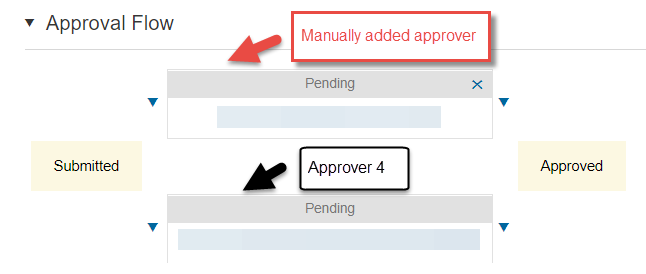
Typically, the approval flow recalculation happens, and the manually added approver node is added at the front of the serial approval chain based on its reference to the next approval node from the original approval flow. In this situation, the reference for placement of the manually added approver node is still intact.
However, if post-submission edits render some of middle approval nodes no longer applicable during the approval flow recalculation, the manually added approver node might be re-added in parallel to any applicable approver nodes from the original approval flow because the manually added approver node didn’t have an existing reference point with the later approver from the original approval flow.
Original approval flow with a manually added approver

After post-submission edit where the middle two approver nodes are removed
There isn’t any way to configure this behavior differently. If you’d like to change how manually added approvers are considered during the approval flow recalculation process, submit an improvement request in the Customer Influence.
Core Procurement > Core Administration > Approval Flows