 |
| ||||||||

You will need to create a legal profile in your AN account in order to have your invoices created in the required fatturaPA format and uploaded to the Sistema di Interscambio (SDI). Entering the correct data is key in getting the invoice created.
La preghiamo di creare un profilo legale nel suo account AN per fare in modo che le sue fatture vengano create nel formato fatturaPA richiesto e caricate nel Sistema di Interscambio (SDI). Inserire i dati corretti è fondamentale per ottenere la fattura creata.
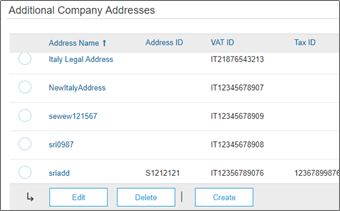
1. Create a new address (= Italian legal entity) in Company settings > Company Profile > Additional Company Addresses:
A. Crea un nuovo indirizzo (quale Profilo Legale) in Impostazioni Societa’ > Profilo Societa’ > Indirizzi aggiuntivi della società:
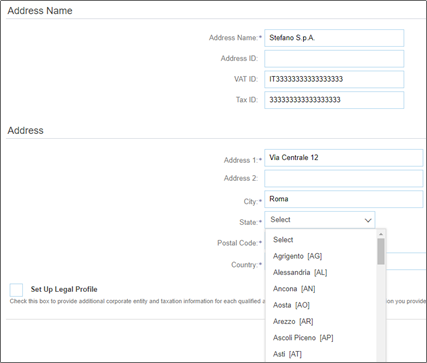
2. Enter the Address Name (the full name of the legal entity) and Address details. Select the State (province):
B. Inserisca il Nome Indirizzo (nome complete del Profilo Legale) ed dettagli dell’Indirizzo. Selezioni Provincia, regione o stato:
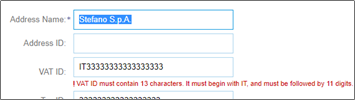
Make sure the correct Italian VAT ID (ID FiscaleIVA) is entered (the same as in the Supplier‘s SDI account). It must equal 13 characters, (e.g. IT followed by 11 digits):
Si assicuri di aver inserito la Partita IVA (lo stesso che nell'account SDI del Fornitore). E deve essere uguale a 13 caratteri, (ad es. IT seguito da 11 cifre):
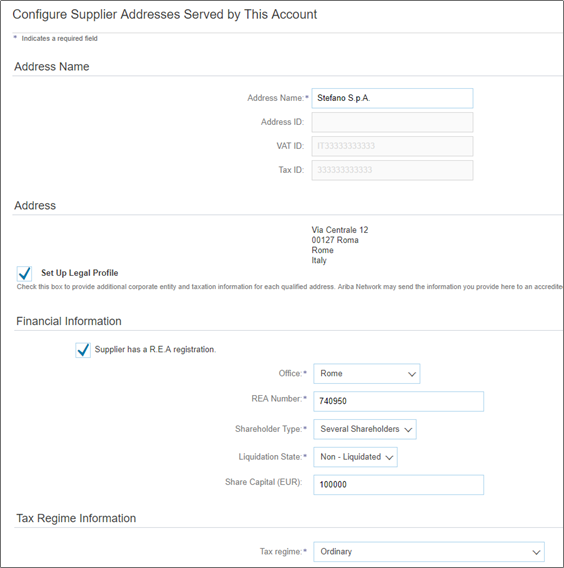
3. Tick the box to the left of Set Up Legal Profile
C. Seleziona la casella a sinistra di Configura profilo legale
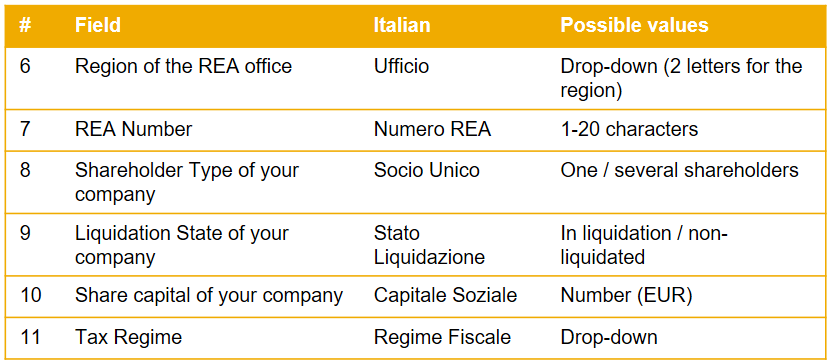
4. If you are registered in the commercial register of companies (REA), please tick the box to the left of Supplier has a R.E.A registration.
D. Se sei registrato nel registro delle imprese (REA), ti preghiamo di barrare la casella a sinistra: Il fornitore dispone di un numero di registrazione REA.
5. Please complete all required fields, e. g. those indicated with an asterisk *
E. Si prega di compilare tutti i campi obbligatori, ad es. quelli indicati con un asterisco *
You can now create your invoice and submit it. The details entered in the supplier legal profile will be auto-populated during invoice creation.
Ora puo’ creare la sua fattura e inviarla. I dettagli inseriti nel profilo legale del fornitore verranno compilati automaticamente durante la creazione della fattura.
SAP Business Network for Procurement & Supply Chain > Administration (Buyer & Supplier Account Administration)
SAP Business Network for Procurement & Supply Chain > SAP Ariba Supply Chain Collaboration