 |
| ||||||||

FAQ KB0395980
Why is there no invitation history under the Messages tab in an event?
Question
Why is there no invitation history under the Messages tab in an event?
Usually under the Messages tab the system shows: "[Realm Name] has invited you to participate in an event: [Event Name]". On the other hand, the only thing showing under the Messages tab is the message to the project team that the event has been published.
Answer
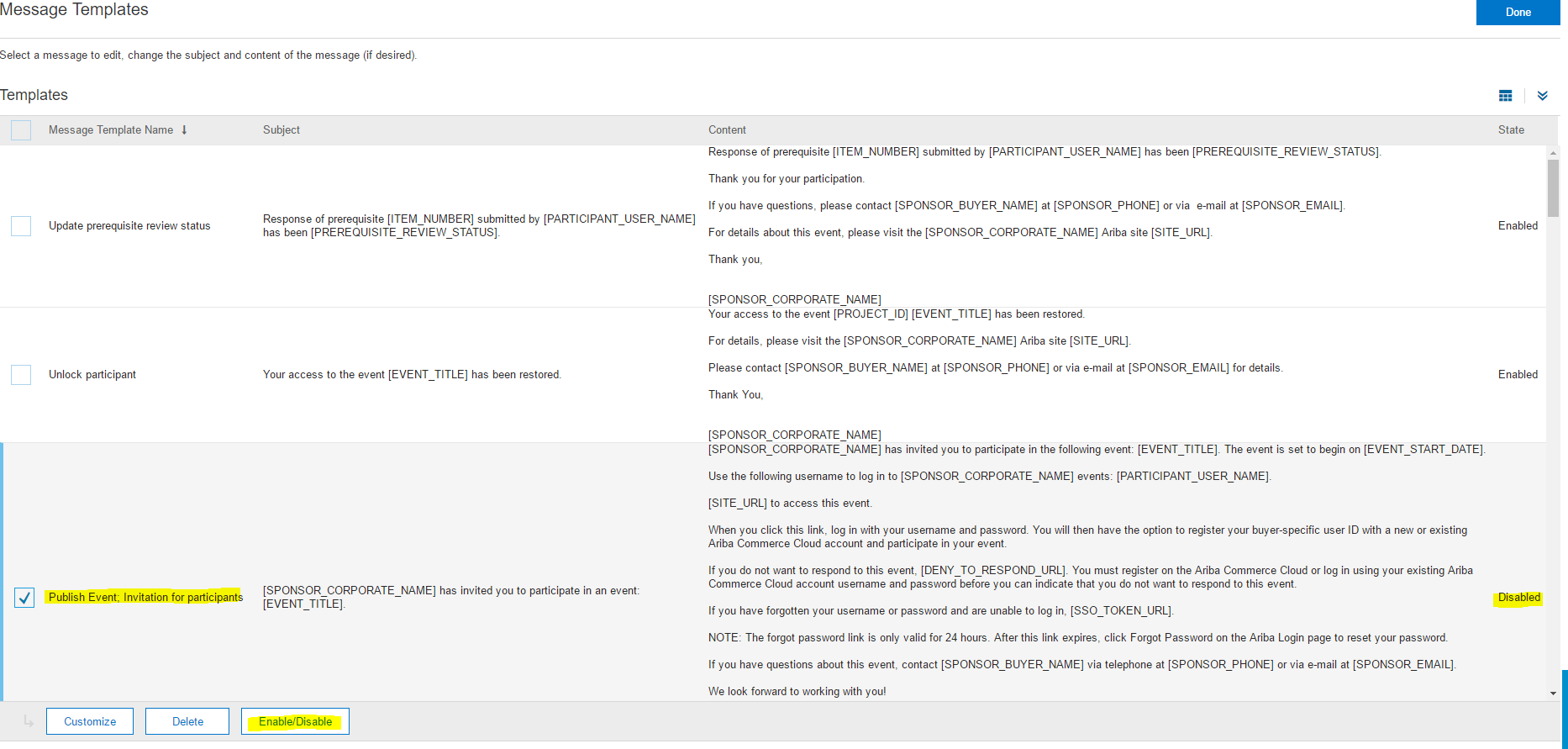
The option Invitation for participants was disabled in the event.
Here are the steps to take in order to enable or disable the invitation messages:
- When monitoring the published event, click Actions > Edit.
- Click the Summary tab and scroll down to the bottom to Customized Messages.
- To the right of Customized Messaged, click Customize.
- Check the box next to Publish Event: Invitation for participants and click Enable/Disable.
- Update the event.
Applies To
Strategic Sourcing > Sourcing Events