 |
| ||||||||

A user only gets one notification when they have to approve a requisition and doesn't receive a reminder.
The user preferences for the user are not set correctly.
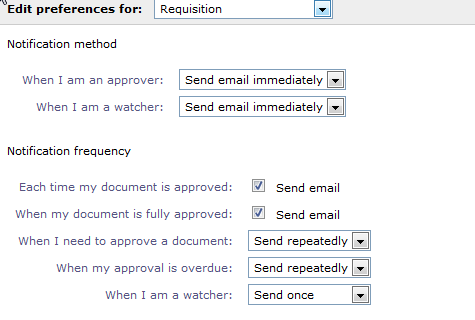
In Preferences / change e-mail notification preferences the user can change his preferences for each type of document.
In the below screenshot, in Notification Frequency there are two options :
- When I need to approve a document : The notification frequency during a normal period (from the time the document requires approval to the time it is escalated)
- When my approval is overdue : The notification frequency after the document is escalated.
The escalation period is parameter driven.
With the default parameter, an escalation warning will be sent to the approver after 7 days (parameter Application.Approvable.ApprovalRequestEscalateWarningPeriod ) , and the document will be escalated after 14 days (parameter Application.Approvable.ApprovalRequestEscalationPeriod ).
Once it is escalated, the approver’s supervisor will be added to the approval flow.
The original approver will still be able to approve the document and will receive notifications at the frequency set according to the ‘When my approval is overdue’ parameter.
- Send Once- Sends individual notifications
- Send Repeatedly- Sends notifications as email summary
- When my approval is overdue- Sends notification after the approvable is escalated
- Escalation warning email is not equal to overdue email
- Once the escalation warning period is breached, only escalation warning emails are sent out. The normal approval email is not sent anymore PS: Approver can still approve via escalation warning email
- Once the escalation period is breached, both the supervisor and the original approver receives notification regarding escalation. Both are able to approve. No notifications regarding approval or escalation warning are sent to the original approver
- The approvable with active Group approver does not receive any notification other than the initial approval email when the doc is submitted.
Core Procurement > Core Administration > Approval Email Notifications