 |
| ||||||||

How does the Import Invoice Status task integrate with Generic Enterprise Resource Planning (ERP) systems?
Documentation for the Improved Error Handling for Failed Invoices feature only includes instructions to incorporate the new functionality for invoices rejected in Oracle®, SAP®, and PeopleSoft® ERP systems.
The integration event, Import Invoice Status is also available for customer sites configured for integration with Generic ERP systems, such as JD Edwards® or Lawson. However, there is no special integration with Generic ERP systems. This feature allows customers who are integrated with SAP, PeopleSoft, and Oracle Financials ERP systems to pull the invoice status from the ERP system automatically, using queries and files that can be downloaded from Ariba Connect. There are no special queries or files to download for Generic ERP systems. Therefore, customer sites that are integrated with Generic ERP systems can use this feature in one of the following ways:
- Manually run the Import Invoice Status task within the Site Manager > Data Import/Export section.
- Map the required information for the data import files from your ERP system fields to the columns within the comma-separated value (CSV) files for this task in order to schedule this task to run directly from your ERP system. Note that the Import Invoice Status task is not supported as a part of the Import Batch Data task, which means that you would need to run this task via its own scheduled import using the Integration Toolkit (ITK). This task would be run under the same name within the ITK, as is indicated in the Integration Toolkit Names column for this task within the Data Import/Export section of your site.
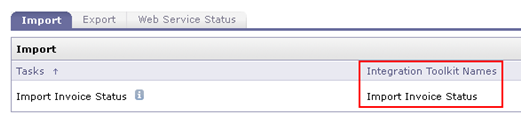
The attached is a ZIP contains sample files configured for integration with a Generic ERP. This ZIP file contains the following files:
- InvoiceIDImport.csv
- InvoiceErrorImport.csv
Please, also refer to your site's Data Dictionary for more information about the columns used within each of these files.
After you import the ZIP file for the Import Invoice Status task, the History tab of the corresponding invoice reconciliation (IR) documents update with an entry that states, "Push error: Error pushing invoice reconciliation to external system":

If you click the Comments link next to this message, the details from the imported files display in the comment:
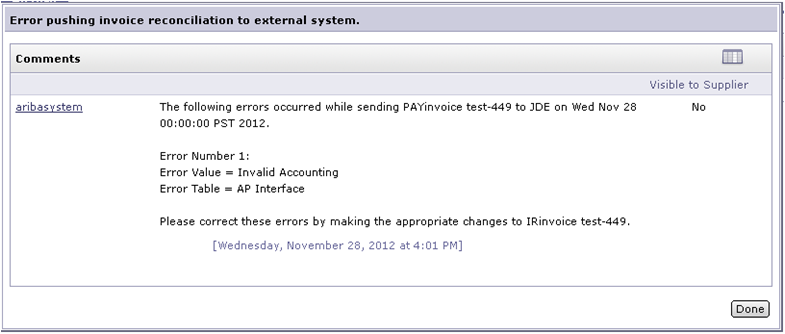
The History tab of the payment (PAY) document also contain a "Push Failed" entry with the same details:

Please see the Ariba 2012 Nov SP2 Release Guide on Ariba Connect for more information about this feature.

Invoicing
Purchasing