 |
| ||||||||

サポートノート KB0393348
エラー: 「UnsupportedEncodingException」カタログアップロード
症状
Error message being shown when importing a catalog in SAP Business Network account:
UnsupportedEncodingException thrown: encoding parameter :UTF-8 UTF-8 is invalid.
原因
Some causes of this error message are the following:
- The CHARSET field at the catalog header includes the UTF-8 (Unicode Transformation Format-8) value twice.
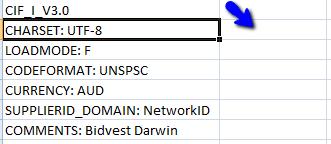
- The UTF-8 value appears in the same column as CHARSET, as shown below:
解決
問題
Ariba Network アカウントにカタログをインポートするとエラーメッセージが表示されます。
UnsupportedEncodingException がスローされました:エンコーディングパラメータ: UTF-8 UTF-8 が無効です。
解決策
UTF-8 値が以下の標準に準拠していることを確認してください。
- UTF-8 値の前に表示されるスペースを削除します。
- UTF-8 を一回のみ指定します。
- 前のスクリーンショットで青い矢印により示されているように、UTF-8 を CHARSET に隣接した列に入力します。
ファイルに値が正しく表示されたら、カタログファイルをアカウントにアップロードします。
原因
このエラーの原因の一部は、以下のとおりです。
- カタログヘッダーの CHARSET フィールドに UTF-8 (Unicode Transformation Format-8) 値が 2 回含まれています。
- UTF-8 値が、以下に示されているように CHARSET と同じ列に表示されています。
該当項目
SAP Business Network for Procurement & Supply Chain > カタログ > カタログのエラー
SAP Business Network for Procurement & Supply Chain > カタログ > カタログ公開