SAP Integration Suite, managed gateway for spend management and SAP Business Network (ISMG)
Migration from SAP BTP NEO to SAP BTP Cloud Foundry (CF)
|
What is Happening?
SAP Business Technology Platform (BTP) has announced the end-of-life for SAP BTP NEO. As such, applications such as Integration Suite, managed gateway for spend management and SAP Business Network (ISMG) must migrate to SAP BTP Cloud Foundry (CF).
We encourage you to check-in on this site until the migration is completed to stay up-to-date!
We have organized all necessary technical details by instance of SAP Integration Suite, managed gateway for spend management and SAP Business Network:
Customer Webcast Sessions!
We are happy to offer some webcasts for you to attend and learn more about this effort. Please review and and attend a session by clicking the date/time you prefer (save the link to your personal calendar). Please note, we will add links for each date/time, so check back!
Completed
We have assembled Frequently Asked Questions and a Steps/Checklist for you as well!
Many common questions are already answered in the FAQ below. We recommend checking it first to find a quicker solution.
For assistance, contact SAP Support using the Support Hotline. We recommend opening a support ticket with the component BNS-ARI-CI-PLT-CON.
|
What do Customers have to do?
- Buyers
- Step 1 — Check your connection type in ISMG under My Configuration → Connection tab. If Transport shows ADDON or CLOUDCONNECTOR, you are using SAP Cloud Connector and must complete Step 2. If not, skip to Step 3.
- Step 2 — SAP Cloud Connector users: Register new BTP Cloud Foundry subaccounts for your region as soon as possible — do not wait until your migration date.
- See the How to Setup Cloud Connector demo for instructions
- Do NOT delete any existing subaccounts. They MUST be retained until migration is complete and transactions have been successfully verified
- Step 3 — IP Allow Listing (if applicable): Only required if your organization currently maintains an IP allow list. If unsure, check with your IT or infrastructure team.
- This applies whether your integration uses Cloud Connector or HTTPS-based connections. The necessary IP details are published in the Regions and API Endpoints for SAP Cloud Foundry Environment resource.
- Add the new BTP Cloud Foundry IP addresses for your region before your migration date. Please see more details in this article.
- Do NOT remove any current IPs. They MUST be retained until migration is complete and transactions have been successfully verified
- Suppliers
- IP Allow Listing (if applicable): Only required if you currently whitelist SBN or Procurement IP ranges. If unsure, check with your IT team or service provider.
- Add the new BTP Cloud Foundry IP addresses for your region before your migration date. IP details are published in this article.
- Updates must be made within your internal systems — no changes are needed to your Managed Gateway for Spend & Network configuration
- Do NOT remove any current IPs until migration is complete and transactions have been successfully verified
IMPORTANT: All necessary changes must be completed in advance of your scheduled migration date. You do not need to wait until your migration date to accommodate these changes. Please make these changes as soon as possible to avoid unnecessary disruption.
We also recommend the adoption of new domain URLs.
What is changing?
- SAP Cloud Connector (SCC) configuration (if you are using SCC)
- IP allowlisting / IP filtering updates (if your network policies require it)
What is not changing during this migration?
- Integration URLs
- Certificates or authentication mechanism
- Functionality/UIs
- All customer data, including transactional and configuration data
|
Schedule
Customers will start noticing the actual impact or changes only when the SAP Business Network, SAP Ariba Buying and Sourcing updates are done.
Note: During this time customers will not face any issues with transaction flow. Only accessing Integration Suite Managed Gateway may have a small interruption of less than 5 minutes due to a restart. Apart from this, there will be no impact to customers.
|
ISMG Data Center - European Union (EU)
Region: cf.eu10.hana.ondemand.com
|
SAP Cloud Connector Subaccount Updates
If you use SAP Cloud Connector, you must add the following Subaccounts. Please do NOT delete any existing subaccounts or IPs. They MUST be retained until the migration is complete and transactions have been successfully verified.
| Environment |
Subaccount ID |
One-time Passcode URL |
| TEST |
c2cd9a88-7143-472a-a358-ac050eacdc39 |
https://aribaeuprodt1.authentication.eu10.hana.ondemand.com/passcode |
| 2fdff90d-496d-4c6d-9f21-26d1bb9f37b5 |
https://aribaeuprodt2.authentication.eu10.hana.ondemand.com/passcode |
| c7845fda-254d-42ef-9069-70bde1d2b647 |
https://aribaeuprodt3.authentication.eu10.hana.ondemand.com/passcode |
| a4eca8c4-328d-492a-8ee0-cfb14a5d751c |
https://cig-production-eu10-outbound-test.authentication.eu10.hana.ondemand.com/passcode |
| PROD |
38ed7fb3-5d18-4ca9-810f-751c5ce2b8ee |
https://aribaeuprodp1.authentication.eu10.hana.ondemand.com/passcode |
| 0a5e6610-0c7d-4e7c-bc16-5181277b7405 |
https://aribaeuprodp2.authentication.eu10.hana.ondemand.com/passcode |
| 6b368bbf-6761-427c-91bd-158a79c2ab0d |
https://aribaeuprodp3.authentication.eu10.hana.ondemand.com/passcode |
| c6938ed8-be1b-4bb3-b140-1bb8c99d76ef |
https://aribaeuprodp4.authentication.eu10.hana.ondemand.com/passcode |
| eddaa307-3566-451f-8d09-57d27dd76985 |
https://aribaeuprodp5.authentication.eu10.hana.ondemand.com/passcode |
| 86efbbb1-a71b-42ca-900d-b7d24be2234e |
https://aribaeuprodp6.authentication.eu10.hana.ondemand.com/passcode |
| c4fdd25c-03cf-480d-9024-082641a58e5a |
https://aribaeuprodp7.authentication.eu10.hana.ondemand.com/passcode |
| 181236c4-d33b-4948-9c14-87d3b4a3b7b5 |
https://cig-production-eu10-outbound-prod.authentication.eu10.hana.ondemand.com/passcode |
For general instructions on Configuring SAP Cloud Connector, please see this. While leveraging these instructions, please be sure to use the Region, Subaccount, and One-time Passcode URL details provided just above on this page. Please remember to use the same Location ID that you are using today for the current Integration Suite, managed gateway for spend management and SAP Business Network. Please maintain "Cloud to On-Premises" settings for the newly added sub accounts to match those of the current settings in SAP Cloud Connector.
When can we make these changes?
The Cloud Connector Subaccount Updates can be made ASAP, but must be done by your scheduled change date.
What happens if we fail to make these changes by the date above?
Your transactions will fail to be received by your ERP.
|
IP AllowList Updating
If you are leveraging IP AllowLists, you must update your AllowList to include the new regional endpoints for your region (cf-eu10, cf-eu10-002, cf-eu10-003, cf-eu10-004, cf-eu10-005).
- This applies whether your integration uses Cloud Connector or HTTPS-based connections.
The necessary IP details are published in the Regions and API Endpoints for SAP Cloud Foundry Environment resource. Please add new Cloud Foundry IPs before migration, but keep existing Neo IPs until migration is fully completed.
When can we make these changes?
You can add the new/future IPs to your AllowList effective immediately, but do not remove the current IPs until the migration is completed for your scheduled change date.
What happens if we fail to make these changes by the date above?
Your transactions will fail to be sent to SAP by your ERP.
|
(back to top)
ISMG Data Center - North America (NA)
Region: cf.us10.hana.ondemand.com
|
SAP Cloud Connector Subaccount Updates
If you use SAP Cloud Connector, you must add the following Subaccounts. Please do NOT delete any existing subaccounts or IPs. They MUST be retained until the migration is complete and transactions have been successfully verified.
| Environment |
Subaccount ID |
One-time Passcode URL |
| TEST |
865860f6-c079-4e00-bfb1-da6d4c202bda |
https://aribausprodt1.authentication.us10.hana.ondemand.com/passcode |
| ca9e875f-3213-4277-89c7-48c0721fe1a8 |
https://aribausprodt2.authentication.us10.hana.ondemand.com/passcode |
| 9f78d636-ced8-441a-8543-23870a6c5353 |
https://cig-production-us10-outbound-test.authentication.us10.hana.ondemand.com/passcode |
| PROD |
bd12b724-5a80-46dd-9834-c748486de411 |
https://aribausprodp1.authentication.us10.hana.ondemand.com/passcode |
| fa099043-3ff3-465a-90a5-808b3f324aac |
https://aribausprodp2.authentication.us10.hana.ondemand.com/passcode |
| 4d527499-b34f-4f67-b046-7c5b561eebbb |
https://aribausprodp3.authentication.us10.hana.ondemand.com/passcode |
| bc3debb0-9dea-468c-ab1d-010ca7f67158 |
https://aribausprodp4.authentication.us10.hana.ondemand.com/passcode |
| c1c8acd4-1921-4c81-a6a6-d04023fde368 |
https://aribausprodp5.authentication.us10.hana.ondemand.com/passcode |
| 80ec591d-5211-44c6-873d-c67456799567 |
https://aribausprodp6.authentication.us10.hana.ondemand.com/passcode |
| 4869e1a2-f119-4a1d-acd8-5211df9aa417 |
https://cig-production-us10-outbound-prod.authentication.us10.hana.ondemand.com/passcode |
For general instructions on Configuring SAP Cloud Connector, please see this. While leveraging these instructions, please be sure to use the Region, Subaccount, and One-time Passcode URL details provided just above on this page. Please remember to use the same Location ID that you are using today for the current Integration Suite, managed gateway for spend management and SAP Business Network. Please maintain "Cloud to On-Premises" settings for the newly added sub accounts to match those of the current settings in SAP Cloud Connector.
When can we make these changes?
The Cloud Connector Subaccount Updates can be made ASAP, but must be done by your scheduled change date.
What happens if we fail to make these changes by the date above?
Your transactions will fail to be received by your ERP.
|
IP AllowList Updating
If you are leveraging IP AllowLists, you must update your AllowList to include the new regional endpoints for your region (cf-us10, cf-us10-001, cf-us10-002, cf-us10-003).
- This applies whether your integration uses Cloud Connector or HTTPS-based connections.
The necessary IP details are published in the Regions and API Endpoints for SAP Cloud Foundry Environment resource. Please add new Cloud Foundry IPs before migration, but keep existing Neo IPs until migration is fully completed.
When can we make these changes?
You can add the new/future IPs to your AllowList effective immediately, but do not remove the current IPs until the migration is completed for your scheduled change date.
What happens if we fail to make these changes by the date above?
Your transactions will fail to be sent to SAP by your ERP.
|
(back to top)
ISMG Data Center - United Arab Emirates (UAE)
Region: mtls.ae01-l-c.uc-live.shoot.live.k8s-hana.ondemand.com
|
SAP Cloud Connector Subaccount Updates
If you use SAP Cloud Connector, you must add the following Subaccounts. Please do NOT delete any existing subaccounts or IPs. They MUST be retained until the migration is complete and transactions have been successfully verified.
| Environment |
Subaccount ID |
One-time Passcode URL |
| TEST |
887c372f-2be8-4f80-86da-240e50453dbf |
https://aribaaeprodt1.authentication.ae01.hana.ondemand.com/passcode |
| ebbde14e-2eb7-4d94-9f8b-c326845f2d14 |
https://aribaaeprodt2.authentication.ae01.hana.ondemand.com/passcode |
| 2c02a921-2922-47f3-a08c-f392d37e2656 |
https://cig-production-ae01-outbound-test.authentication.ae01.hana.ondemand.com/passcode |
| PROD |
88f4f4b6-7e16-4492-8365-1222d9b712c3 |
https://aribaaeprodp1.authentication.ae01.hana.ondemand.com/passcode |
| f29eabd2-7d73-48ec-8464-80708ac9e25f |
https://aribaaeprodp2.authentication.ae01.hana.ondemand.com/passcode |
| 3d277c25-9444-4a26-943f-59037be3bd72 |
https://cig-production-ae01-outbound-prod.authentication.ae01.hana.ondemand.com/passcode |
For general instructions on Configuring SAP Cloud Connector, please see this. While leveraging these instructions, please be sure to use the Region, Subaccount, and One-time Passcode URL details provided just above on this page. Please remember to use the same Location ID that you are using today for the current Integration Suite, managed gateway for spend management and SAP Business Network. Please maintain "Cloud to On-Premises" settings for the newly added sub accounts to match those of the current settings in SAP Cloud Connector.
When can we make these changes?
The Cloud Connector Subaccount Updates can be made ASAP, but must be done by your scheduled change date.
What happens if we fail to make these changes by the date above?
Your transactions will fail to be received by your ERP.
|
IP AllowList Updating
If you are leveraging IP AllowLists, you must update your AllowList to include the new regional endpoints for your region (ae01).
- This applies whether your integration uses Cloud Connector or HTTPS-based connections.
The necessary IP details are published in the Regions and API Endpoints for SAP Cloud Foundry Environment resource. Please add new Cloud Foundry IPs before migration, but keep existing Neo IPs until migration is fully completed.
When can we make these changes?
You can add the new/future IPs to your AllowList effective immediately, but do not remove the current IPs until the migration is completed for your scheduled change date.
What happens if we fail to make these changes by the date above?
Your transactions will fail to be sent to SAP by your ERP.
|
(back to top)
ISMG Data Center - China
Region: cf.cn40.platform.sapcloud.cn
|
SAP Cloud Connector Subaccount Updates
If you use SAP Cloud Connector, you must add the following Subaccounts. Please do NOT delete any existing subaccounts or IPs. They MUST be retained until the migration is complete and transactions have been successfully verified.
| Environment |
Subaccount ID |
One-time Passcode URL |
| TEST |
a84e1de1-9875-48da-9be8-5917098092b4 |
https://aribaprodcnt1.authentication.cn40.platform.sapcloud.cn/passcode |
| 6794ea15-de6a-4a2a-9d91-a84ed3efb212 |
https://aribaprodcnt2.authentication.cn40.platform.sapcloud.cn/passcode |
| 8dced308-6076-4cd3-bdf2-f488a2366090 |
https://cig-production-china-outbound-test.authentication.cn40.platform.sapcloud.cn/passcode |
| PROD |
edf0094a-6e4c-4c57-be5f-dac4a9c4e7a6 |
https://aribaprodcnp1.authentication.cn40.platform.sapcloud.cn/passcode |
| 22054ed9-9109-4b0f-9fce-8835c4146322 |
https://aribaprodcnp2.authentication.cn40.platform.sapcloud.cn/passcode |
| ced366bb-7581-4f6e-ac14-8cd367ed9a9e |
https://cig-production-china-outbound-prod.authentication.cn40.platform.sapcloud.cn/passcode |
For general instructions on Configuring SAP Cloud Connector, please see this. While leveraging these instructions, please be sure to use the Region, Subaccount, and One-time Passcode URL details provided just above on this page. Please remember to use the same Location ID that you are using today for the current Integration Suite, managed gateway for spend management and SAP Business Network. Please maintain "Cloud to On-Premises" settings for the newly added sub accounts to match those of the current settings in SAP Cloud Connector.
When can we make these changes?
The Cloud Connector Subaccount Updates can be made ASAP, but must be done by your scheduled change date.
What happens if we fail to make these changes by the date above?
Your transactions will fail to be received by your ERP.
|
IP AllowList Updating
If you are leveraging IP AllowLists, you must update your AllowList to include the new regional endpoints for your region (cn40). The necessary IP details are published in the Regions and API Endpoints for SAP Cloud Foundry Environment resource. Please add new Cloud Foundry IPs before migration, but keep existing Neo IPs until migration is fully completed.
When can we make these changes?
You can add the new/future IPs to your AllowList effective immediately, but do not remove the current IPs until the migration is completed for your scheduled change date.
What happens if we fail to make these changes by the date above?
Your transactions will fail to be sent to SAP by your ERP.
|
(back to top)
(back to top)
Region Codes for SAP BTP Neo and SAP BTP Cloud Foundry
|
|
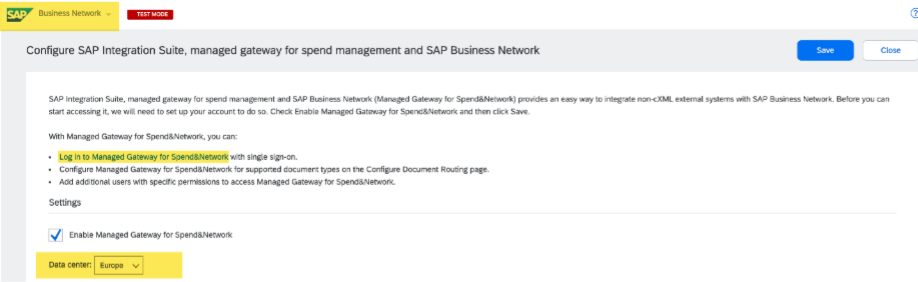
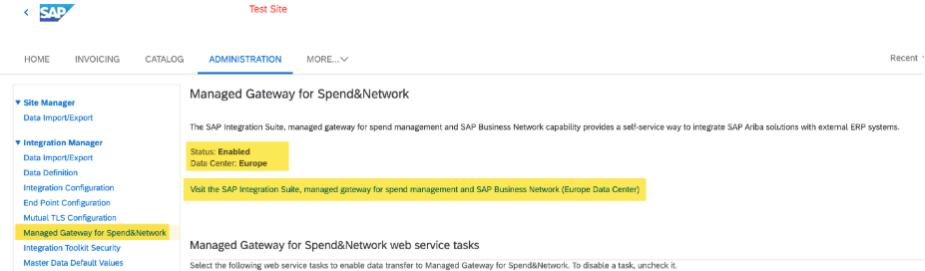
To identify what Data Center applies to your organization, please log in to SAP Business Network or your SAP Ariba Procurement/Sourcing system (prior to accessing ISMG). You will find the applicable Data Center information displayed accordingly:
| SAP Business Network |
SAP Ariba Solutions |
 |
 |
| ISMG Data Center |
SAP BTP Neo Region |
SAP BTP Cloud Foundry Region |
| United Arab Emirates (UAE) |
ae1 |
ae01 |
| North America (NA) |
us4 |
us10 |
| European Union (EU) |
eu1 |
eu10 |
|
(back to top)
Frequently Asked Questions
|
General / Getting Started
How can customers determine their Data Center?
Please note that Region might be different from your company location. When you access ISMG, you can user the URL showing up in your browser to determine your Data Center:
- UAE: integration-uae.ariba.com
- NA: integration-us.ariba.com
- EU: integration.ariba.com
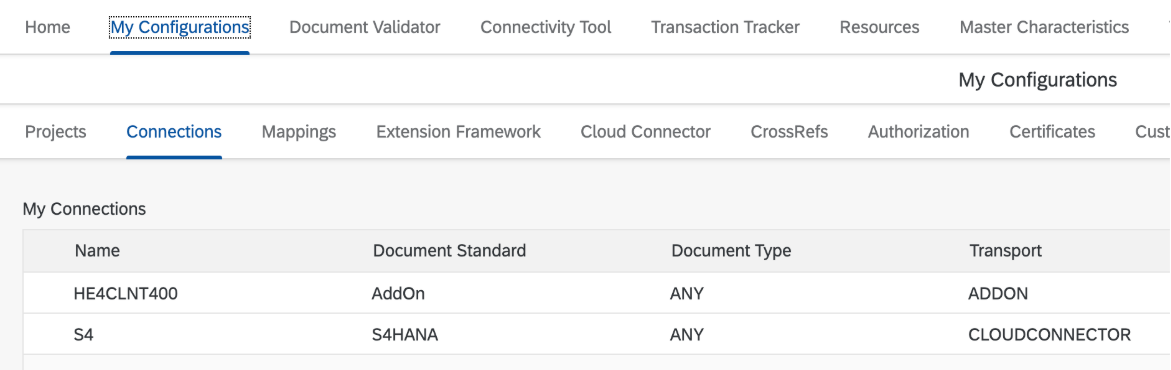
How can we check if we're using SAP Cloud Connector? / How can I tell if I'm applicable to make changes?
In ISMG, go to the My Configuration > Connection tab. If Transport has ADDON or CLOUDCONNECTOR, that means you are using SAP Cloud Connector:
What if I don't use SAP Cloud Connector (SCC)?
If you do not see “Cloud Connector” /"AddOn" in your ISMG portal, that indicates you are not using SCC, so there is no SCC-related action required. You should still confirm with your IT team whether you use IP filtering / allowlisting and update it if needed.
What if I use CPI instead of a direct Cloud Connector connection?
This migration is specific to ISMG. Standalone CPI is not impacted. Where CPI is part of the integration landscape, customers should still review IP allowlisting from their side if applicable.
Is it mandatory to switch to the new BTP Cloud Foundry domains during this migration?
It is recommended, but not mandatory to adopt the new domain URLs.
|
Schedule & Timeline
What is the migration timeline on the day of the event?
The tentative maintenance windows are listed in the Schedule table above. Please note these windows are tentative — our migration can only begin after dependent solutions (SBN, SSP, and S4) have completed their own changes. The actual start time may shift within the window depending on when those upstream steps are finished.
We do not recommend customers remain on standby during the window. There is no action required from customers at the time of migration. Instead, we recommend checking your integration status the next business day to confirm transactions are flowing as expected.Yes. To reduce risk during migration, we strongly advise against making any changes to your ISMG portal configurations — including projects, connections, or user settings — in the days leading up to your scheduled migration date. Last-minute changes increase the risk of errors that may be difficult to diagnose during the maintenance window. Please complete all preparation steps well in advance.
Are there any restrictions on changes I make before the migration date?
Yes. To reduce risk during migration, we strongly advise against making any changes to your ISMG portal configurations — including projects, connections, or user settings — in the days leading up to your scheduled migration date. Last-minute changes increase the risk of errors that may be difficult to diagnose during the maintenance window. Please complete all preparation steps well in advance.
When can I make the Cloud Connector and IP Allowlist changes?
All preparation steps — adding new Cloud Foundry subaccounts and updating IP Allow Lists — can and should be completed as soon as possible. Do not wait until your migration date. Your current (NEO) configuration will remain active and fully functional until the migration cutover occurs. Making changes early reduces risk and gives you time to troubleshoot.
|
SAP Cloud Connector
If we are already using a Cloud Foundry environment with SAP Cloud Connector, do we still need to add the new CF subaccounts in SAP CC?
Yes, even if your current SAP Cloud Connector is connected to a Cloud Foundry subaccount, it is still necessary to add the new Cloud Foundry subaccounts. This requirement arises due to the migration of SAP Integration Suite (Managed Gateway for Spend Management) and SAP Business Network from NEO to SAP BTP Cloud Foundry (CF). It is independent of the customer’s existing Cloud Connector setup.
I used my P-user and P-user password to configure the subaccount. Is that OK?
No. You must use the One-Time Passcode (OTP) instead of the P-user password.
What should I do if I configured the subaccount using a P-user instead of the One-Time Passcode?
Delete the subaccount configuration and recreate it from scratch using the One-Time Passcode (OTP).
Why can't the P-user be used? Why must the One-Time Passcode be used? What's the difference?
- The OTP is part of SAP’s security design for onboarding Cloud Foundry subaccounts to the Cloud Connector.
- It is short‑lived, single‑use, and designed to minimize credential exposure during the trust setup.
- While it may sometimes be possible to onboard using a P‑user password, it is unsupported, increases security risks, and does not comply with SAP’s recommended security practices.
SAP officially recommends using the OTP method only.
How do I get a One-Time Passcode (OTP)?
Follow the Steps to add cloud foundry subaccounts of Managed Gateway for Spend & Network
I see the identifier $SAP-CP-SSO-PASSCODE$ in the "Initiated By" field when using SAP Cloud Connector. Is this expected?
Yes. This is expected behavior in older Cloud Connector versions where the technical SSO passcode identifier cannot be replaced with a P-user.
What should customers do to resolve this?
Customers are strongly advised to upgrade to the latest SAP Cloud Connector version. The upgrade provides:
- Accurate representation of initiating users (where supported)
- Improved transparency in audit and monitoring logs
- Alignment with SAP's latest security and compliance standards
- Enhanced logging, auditing, and user identification capabilities
After upgrading, customers may still need to configure users again, but the Cloud Connector will no longer reflect the passcode instead of the P-user.
My environment uses a Web Dispatcher, Load Balancer, or Gateway between the SAP Cloud Connector (SCC) and the backend SAP ERP or S/4HANA system. Are there any additional configuration steps?
We recommend consulting with the team responsible for managing your Web Dispatcher, Load Balancer, or Gateway to confirm which host value in the HTTP request header should be transmitted to the target server from the SCC. Based on this confirmation, configure the Host in Request Header field accordingly in SAP Cloud Connector > Cloud To On-Premises > System Mapping for each of the Cloud Foundry (CF) subaccounts.
When selecting Use Internal Host, the actual hostname will be used in the request header. When selecting Use Virtual Host, the virtual hostname will be used instead. In the latter case, the virtual host value is additionally forwarded via the X-Forwarded-Host header. More info refer SCC configuration guide here, point 10.
Where can customers go to update their P-user password and when do they need to do it?
Customers can update their P‑user password by navigating to My Configurations → Authorization tab and clicking Change Password. They should only perform this action when they no longer remember their current P‑user password or must reset it for security reasons.
Important note: Changing the P‑user password in the portal should be considered a last resort. This action can disrupt production and test transactions originating from SAP ERP or SAP S/4HANA systems. To avoid integration failures or account lockouts, ensure that the new password is updated simultaneously across all connected interfaces and end systems where the P‑user is used. Alternatively, temporarily pause message transmission during the password update window.
For related configuration steps, customers can also refer to Steps to add cloud foundry subaccounts of Managed Gateway for Spend & Network.
|
IP Allow Listing
How can I check if I need to update IP Allow Lists? Do I need to update IP Allow Lists? How do I know if this applies to me?
IP allow listing updates are only required if your organization currently maintains an IP allow list. If you are unsure, check with your IT or infrastructure team before taking any action.
Please add new Cloud Foundry IPs before migration, but keep existing Neo IPs until migration is fully completed.
Buyers
If you use SAP Cloud Connector, refer to the SCC subaccount steps for your region above. In addition, if your environment enforces IP allow listing, you must also add the new BTP Cloud Foundry IP ranges for your region. This applies whether your integration uses Cloud Connector or HTTPS-based connections (e.g., SAP PI, SAP CPI/Integration Suite, or any destination URL connecting directly to ISMG endpoints). The necessary IP details are published in the Regions and API Endpoints for SAP Cloud Foundry Environment resource.
Suppliers
If you are a supplier using SAP Integration Suite, Managed Gateway to exchange transactions with SAP Business Network, and you currently whitelist SBN or Procurement IP ranges, you must update those ranges to include the new Cloud Foundry IPs.
- Review your internal tools, applications, or servers used to send transactions to the network
- Contact your service provider if they manage your IP filtering on your behalf
- Update the IP ranges within your internal systems — no changes are needed to your Managed Gateway for Spend & Network configuration itself
Important: SAP cannot estimate all activities required within your internal organization. Please treat this guidance as a starting point and work with your IT team to confirm what is needed.
What happens if no action is taken?
Your internal systems will no longer recognize the new IP ranges and may stop accepting or transmitting data after migration. SAP Business Network will continue sending transactions as normal — but your environment will reject them if it is still relying on the old IP ranges for security checks.
Please do NOT remove any existing IPs until the migration is complete and transactions have been successfully verified.
For additional guidance: Supplier IP Allowlisting Reference | Buyer IP Allowlisting Reference | Regions and API Endpoints for SAP Cloud Foundry Environment
If you are unsure whether this applies to your setup, check with your IT/Basis team or open a case under BNS-ARI-CI-PLT-CON with your ANID and connection details.
If I use SAP S/4HANA Public Cloud. do I need to do anything regarding IP Allow Listing?
If you previously maintained an IP allowlist, ensure that the new subaccount IP ranges are included. SAP will update the KBA section on IP Allowlist Updating to help identify correct IPs per region.
If I use SAP S/4HANA Private Cloud hosted by SAP, do I need SAP to update IP Allow Listing?
Private Cloud Edition customers can restrict IPs. SAP recommends raising a PCO-OPS support ticket to confirm whether additional IPs need to be allow listed.
Should we Allow List all IPs for our region?
Yes. All entries should be included as ISMG may use additional domains in the future.
When configuring firewall rules, is the NAT IP used for inbound (ISMG to S/4) and load balancer IP for outbound (S/4 to ISMG)?
Yes. Details are available in the BTP help guide.
We already allow traffic from *.ariba.com. Is that sufficient?
Not necessarily. Hostnames and IPs for the ISMG subaccounts are based on BTP and are different from ariba.com, so customers should review the exact IP details in the referenced migration article and validate them with their infrastructure team where needed.
What happens if I remove the old IPs before migration is complete?
Removing existing IP allow list entries before migration completion may lead to transaction failures or disruptions in communication with the Ariba Business Network.
|
Verification & Testing
Is there a way to test whether the subaccount configuration is correct before the migration?
No pre-migration end-to-end testing is not available for the new ISMG subaccounts. However, you can confirm your preparation is complete by verifying:
- SAP Cloud Connector: A green "Connected" status in the Cloud Connector administration UI for each new subaccount confirms the trust relationship is established. If you keep the same Location ID and can perform a successful ping test from SCC to your backend system, the configuration is considered complete.
- IP Allow Lists: Confirm with your network/firewall team that the new Cloud Foundry IP ranges have been added and are active. Do not rely on a connectivity test to ISMG before migration — the new endpoints will not be live until the cutover.
A successful Cloud Connector connection to the new subaccounts is sufficient preparation. You do not need to wait for a transaction to confirm readiness.
I believe I have completed all required changes. How do I verify?
Use this checklist to confirm your preparation is complete:
SAP Cloud Connector (if applicable):
IP Allow Listing (if applicable):
No action needed for: Integration URLs, certificates, authentication mechanisms, or functionality — none of these change.
If you have completed all items above and want SAP to confirm your readiness, open a case under BNS-ARI-CI-PLT-CON and provide your ANID, realm, or project details.
How will I know the system is back up after the migration downtime?
SAP will communicate the maintenance window start and end times via the EVB notice for your region. After the migration cutover, systems are expected to be operational after the announced window. Once the window closes, attempt a test transaction via your ERP system and monitor your integration logs for successful document exchange. If transactions are not flowing within a reasonable time after the window, log a P1 case under BNS-ARI-CI-PLT-CON.
How do I confirm success before go-live?
A successful Cloud Connector connection to the new ISMG subaccounts is sufficient for migration preparation. Customers should also ensure that the same Location ID is retained and that Cloud to On-Premises settings are maintained.
Is there any practical check I can do?
If you keep the same LOCATION ID and can perform a ping test from Cloud Connector to your backend system, the configuration is considered done and good to go.
|
Post-Migration
When can I delete my old subaccounts?
After connecting to the new subaccounts, customers should keep the old ones until after the migration date and until they have confirmed that the transactions are flowing as expected via the new subaccounts.
When can I remove old (Neo) IPs?
Once migration has is completed and validated, you can then safely delete the old (Neo) IP allow listing entries.
How do I confirm success after migration?
After the migration cutover, systems are expected to be operational after the announced window. Once the window closes, attempt a test transaction via your ERP system and monitor your integration logs for successful document exchange. If transactions are not flowing within a reasonable time after the window, log a P1 case under BNS-ARI-CI-PLT-CON.
Will I receive a notification when the migration is complete?
A migration completion notice is not part of the standard procedure. Since this migration is performed during a scheduled maintenance window, a separate completion notification is not sent in order to avoid repetitive communications to customers.
To confirm when your migration is expected to be done, refer to the tentative window in the Schedule section above. We recommend verifying your integration status on the next business day by checking that transactions are flowing as expected through your ERP system.
If transactions are not flowing as expected, log a support case under BNS-ARI-CI-PLT-CON.
|
Troubleshooting
“SCC handshake failed: 401 — Unauthorized”
Create a support case under BNS-ARI-CI-PLT-CON and include the error details. This error can be associated with authorization issues when setting up or activating required subaccounts.
I used my P-user / P-account password when adding the new subaccounts. Is that OK?
No. If you used the P-user / P-account credentials directly instead of the required one-time passcode, the setup must be redone using the one-time passcode. The P-user credentials are used to obtain the one-time passcode, which is then used to configure the subaccounts.
Do I need to install a new certificate as part of the migration?
No. No certificate changes are required as part of this BTP Neo to Cloud Foundry migration.
We already allow traffic from *.ariba.com. Is that sufficient?
Not necessarily. Hostnames and IPs for the ISMG subaccounts are based on BTP and are different from ariba.com, so customers should review the exact IP details in the referenced migration article and validate them with their infrastructure team where needed.
|
Support (How to get help)
Where to open a case
Open a support case under component BNS-ARI-CI-PLT-CON.
When to use high priority / P1 ticket
If an issue occurs after the migration, log a P1 case under BNS-ARI-CI-PLT-CON so Support can engage quickly.
If you want SAP to confirm your situation
To confirm whether action is required for your specific setup, open a case under BNS-ARI-CI-PLT-CON and request confirmation. When setup verification is needed, provide ANID, realm, or project details in the support case.
|
(back to top)
Additional Information
|
Questions?
- For assistance, contact SAP Support using the Support Hotline. We recommend opening a support ticket with the component BNS-ARI-CI-PLT-CON.
|
Additional Resources:
|
© 2025 SAP SE or an SAP affiliate company. All rights reserved. See Legal Notice on www.sap.com/legal-notice for use terms, disclaimers, disclosures, or restrictions related to this material.
|

