 |
| ||||||||

Support Note 137103
Error: "UnsupportedEncodingException" catalog upload
Issue
Error message being shown when importing a catalog in Ariba Network account:
UnsupportedEncodingException thrown: encoding parameter :UTF-8 UTF-8 is invalid.
Resolution
Ensure the UTF-8 value adheres to the following standards:
- Remove any spaces that appear before the UTF-8 value.
- Specify UTF-8 only once.
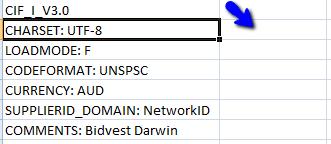
- Enter the UTF-8 in the column adjacent to CHARSET, as indicated by the blue arrow in the previous screenshot.
After the value appears correctly in the file, upload the catalog file to your account.
Cause
Some causes of this error message are the following:
- The CHARSET field at the catalog header includes the UTF-8 (Unicode Transformation Format-8) value twice.
- The UTF-8 value appears in the same column as CHARSET, as shown below:
Applies To
SAP Business Network