 |
| ||||||||

Why do foreign characters incorrectly display as special characters in the User Interface and Catalogs? For Example, "wählen" may appear as "w%hlen".
This occurs due to the Character Set used when loading the data into Ariba. Unicode Transformation Format-8 (UTF-8) Character Encoding, a normal Character Set used very often, does not allow for these special characters. Change the encoding to one that allows for these special characters (such as ISO-8859-1 for Western Europe).
You can confirm that this causes the issue by exporting the data from Ariba. The exported file contains the Character Encoding used when importing the data into Ariba, and you see that the foreign characters are all removed.

This concept can be applied to catalogs loaded into Ariba as well. If the catalog must contain foreign characters, then the catalog must be encoded in a different character set which contains the needed characters. Each Catalog loaded into Ariba has a "CHARSET" field set in the header, which allwos for the needed character set to be defined (similar to the encoding header mentioned in the above information for CSV imports). The below ship shows an example of a Catalog header referencing a Baltic Character CHARSET (ISO-8859-13) to allow for Polish characters.
CIF_I_V3.0
LOADMODE: F
SUPPLIERID_DOMAIN: buyersystemid
COMMENTS: Generated on Oct 10 00:00:00 PDT 2013
UNUOM: TRUE
CURRENCY: EUR
CHARSET: ISO-8859-13
The screenshot below shows an item loaded into Ariba using Polish characters. This item was loaded twice, once incorrectly encoded in UTF-8 (highlighted in red) and then once correctly encoded in ISO-8859-13 (highlighted in green).
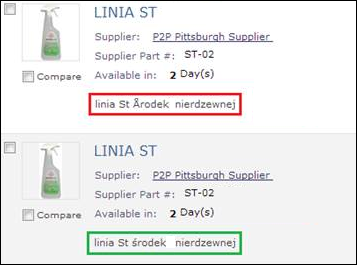
Please Note: This is for master data loaded into Ariba and Catalogs. This information may not be applicable for Spend Visibility data.
Purchasing